Inspect the real guest. Plan the move. Read through VDDK HotAdd, with
VMware's library or OpenVDDK.
Convert, validate, cut over, and hand off to open KVM infrastructure
from one operator-controlled platform.
100% FREEFull product. Self-hosted. No software license fee.
Free of charge, self-hosted, and clear about the terms.
Organizations leaving VMware need a migration platform that is complete,
inspectable, and not tied to a license negotiation. The model below is
straightforward. There is no premium tier.
01 · License
No software license fee
The full product will be free of charge, with no per-VM or feature-tier
fees. It will run self-hosted in infrastructure you control. Final
usage terms will be published before release, but the full product
will remain free of charge regardless of the licensing model chosen.
02 · Source code
Closed source for now
The initial release will be closed source. The long-term goal is to
make the project open source, but no timeline has been set for that
transition.
Bug reports and release notes will be public from the first release.
03 · Funding
Independently funded
Development is independently funded. The full product remains free
of charge. Any future paid services will be optional and separate
from the software.
Maintained by
Andrija Panić, PMC member of the
Apache CloudStack
project, with years of VMware-to-CloudStack and KVM migration work at
ShapeBlue before this product. V2K Migrate is built from how hypervisors
behave in production, not from a generic disk converter.
He is also the author of OpenVDDK, the independent VDDK-compatible
library V2K Migrate is developed with.
The actual product
Built to be inspected before it is trusted.
Every view below comes from the product-derived read-only demo. The
infrastructure and workload data are synthetic.
Filter VMware inventory by vCenter, cluster, datastore, guest OS, power state, CPU, memory, disk footprint, inspection state, and migration status before building a plan.
51,001 visible synthetic VMs · Filtered and paginatedWorking pre-release interface · Synthetic data · Interface may evolve before release
vCenter & VMware Tools evidence
Know what is inside the guest, not only what vCenter reports.
View OS and network details in the inventory. Optional read-only guest-disk inspection adds evidence when vCenter or VMware Tools data is missing, including for powered-off VMs, before you build a migration plan.
Machine, disk, NIC, and persisted network evidenceWorking pre-release interface · Synthetic data · Interface may evolve before release
Warm / CBT execution
See the entire migration, not a progress spinner.
Lifecycle state, topology, per-VM and per-disk progress, throughput, destination adoption, and operator controls stay visible in one operational surface.
Warm / CBT plan · Proxmox VE destinationWorking pre-release interface · Synthetic data · Interface may evolve before release
Source-aware validation
Surface migration risks before data starts moving.
Worker placement, concurrency, storage and network readiness are evaluated alongside source conditions such as snapshots and vTPM. Warnings stay attached to the affected VM and remain visible before cutover.
Worker capacity · Source vTPM detection · VM-level evidenceWorking pre-release interface · Synthetic data · Interface may evolve before release
Why VDDK HotAdd
Datastore reads. No NBD data stream.
Snapshot-backed VMDKs are HotAdded to Linux workers inside vSphere and
opened as locally accessible whole disks. The migration engine reads from
that attached block device; the control plane schedules and observes.
Control planeInventory · Placement · Scheduling · Telemetry
HotAdd is the architecture, not an opportunistic optimization.
V2K Migrate validates datastore-aware worker placement before a plan
starts. It does not hide a failed HotAdd path by silently moving bulk
reads onto NBD.
Data-path propertyVDDK HotAddNBD / NBDSSL
Disk accessVMDK attached to worker VMBlocks served by ESXi over the network
Bulk read pathDatastore and ESXi I/O pathLAN / NFC path, port 902 by default
Read modelWhole-disk block access on the workerSynchronous VDDK block requests
Operational constraintWorker must access the source datastoreNFC host and vCenter session limits apply
How to make it faster
The library underneath: OpenVDDK
Broadcom removed the VDDK from its public download portal on 25 August
2026. V2K Migrate was developed against the original VDDK libraries.
Following that sudden removal, a new library was born -
OpenVDDK
- an independent, drop-in replacement for
libvixDiskLib.so.8.0.3, written from scratch using only public
documentation and black-box testing. Same file name, same functions, same
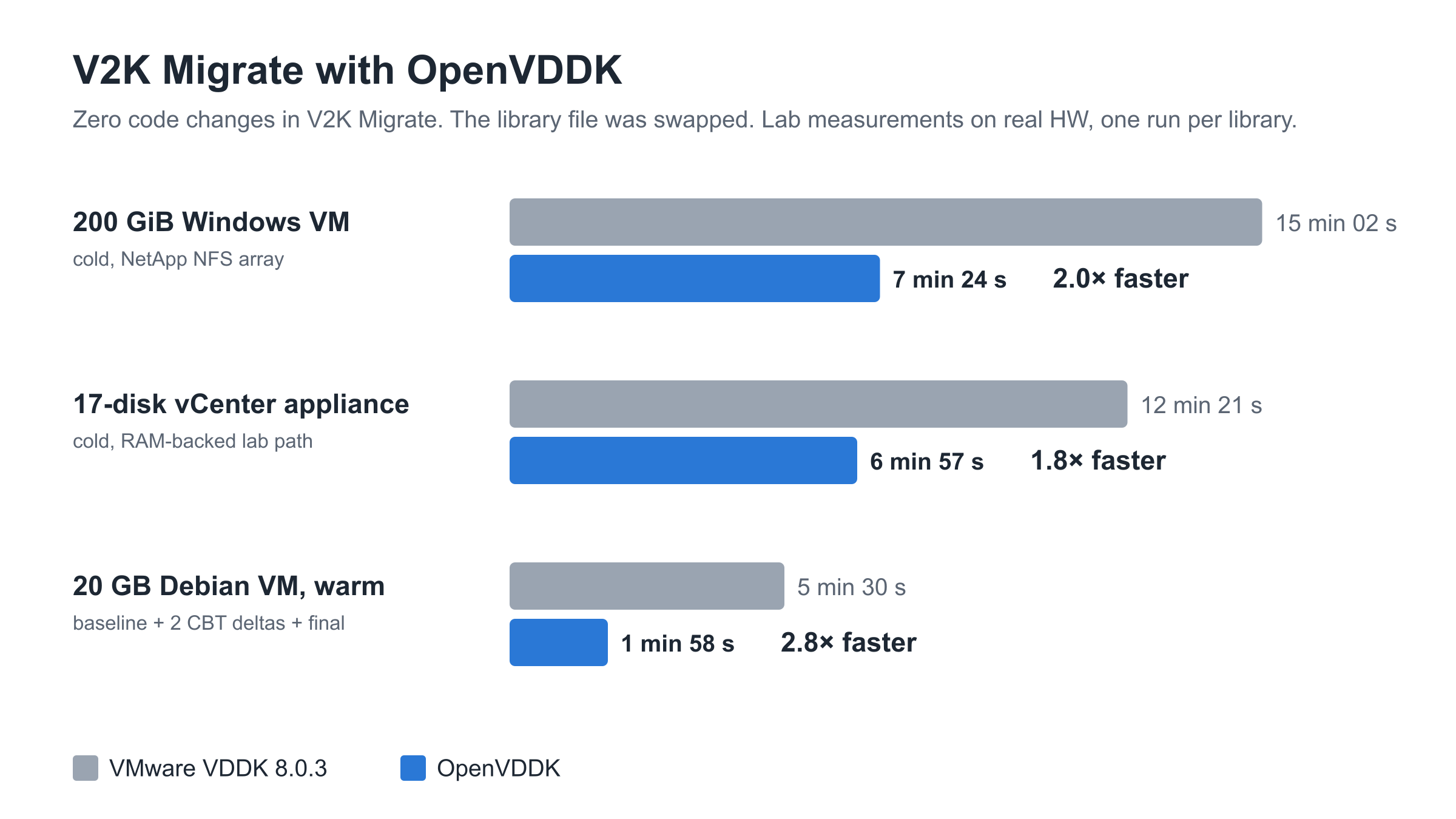
data. In our lab, swapping only that file made whole migrations 1.8 to 2.8
times faster.
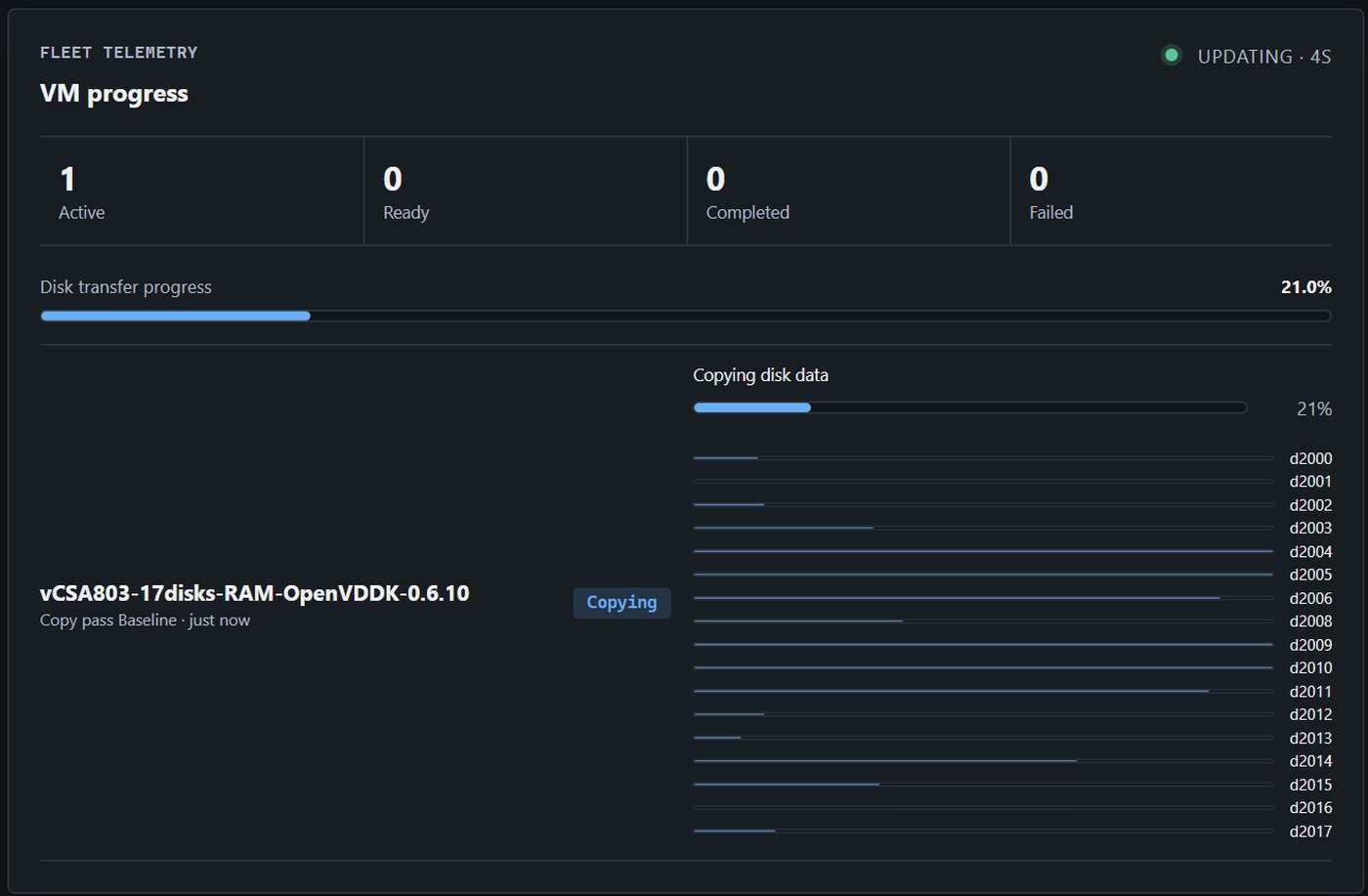
A real lab run, not the demo: one VM with 17 disks, all of them copying
at once over HotAdd, 1 min 49 s after the worker took it.
Lab measurements, one run per library, ESXi and vCenter 8.0.3. OpenVDDK is
in its final HotAdd testing phase; NBD and NBDSSL come next.
Coordinate discovery, planning, preflight, cold or warm transfer,
validation, guest inspection, conversion, and destination adoption
as one migration plan.
PlanOperator decisions
MoveWorker data path
AdoptPlatform or storage-only
01
Discover and inspect
Synchronize vCenter inventory, filter the estate, and read OS, firmware, disk, and network evidence from vCenter and VMware Tools. Optionally inspect the guest disk for further network evidence.
02
Build the migration plan
Group VMs into a batch with shared migration options and per-VM overrides. Choose CloudStack, Proxmox, or storage-only handoff, then a compatible storage pool and network mapping. Select cold or warm migration, warm delta and cutover settings, and optional data checks, guest inspection, conversion, and Windows static IP preservation.
03
Prove the path
Check every VM in the plan for workload eligibility, worker access, storage, capacity, networking, and destination configuration. Green means OK; orange warnings explain limitations but allow the plan to start. Red blockers prevent the entire plan from starting until resolved.
04
Move cold or warm
Copy through VDDK or OpenVDDK HotAdd: one cold pass or scheduled warm CBT passes with bounded concurrency. At warm cutover, gracefully shut down the source VM, then transfer the final delta. All source-to-destination copying finishes here, before validation and guest conversion.
05
Validate, inspect, and convert
Optionally compare source and destination disk samples and inspect the guest read-only. Windows static IP preservation enables registry inspection to read actual addressing settings. If selected, then run virt-v2v in place to prepare the guest for KVM. Retain conversion evidence; no further source data is copied after conversion begins.
06
Import or hand off
For CloudStack or Proxmox, import the VM after the preceding stages succeed. Optional automatic import and/or power-on are planned for both platforms, with separate operator choices. For storage-only handoff, no platform import is required: the migrated disks and machine descriptors are ready for separate adoption.
Storage and destinations
One migration engine. Multiple target paths.
Write directly to the storage you operate, then hand the result to a
destination integration or a platform-neutral storage workflow.
SourceVMware / vSphere VDDK HotAdd + CBT
Migration engineInspect + copy + prepare Worker data path
FileNFS / QCOW2
BlockCeph RBD
GatewayLINSTOR / DRBD
Implemented 01
CloudStack
The first deeply developed destination integration, with preflight, import, and operator-controlled adoption.
Implemented 02
Proxmox
VMware-to-Proxmox migration with NFS/QCOW2 or Ceph RBD storage.
Implemented 03
Storage-only handoff
Migrated disks and machine descriptors ready for separate platform adoption or custom automation.
Under the hood
Move less data. Keep more control.
The engine is designed around the source read path, storage write path,
and the operator decisions that make a migration safe to execute.
01
Inventory with evidence
Search large VMware estates and inspect real guest OS, firmware, disk, and network state before planning.
02
Cold and warm execution
Run cold copies or repeated CBT passes scheduled ahead of a controlled final cutover.
03
Purpose-built data path
Use VDDK HotAdd, allocated-block-aware reads, bounded disk streams, and direct target writes.
04
Preflight and hard gates
Block unsafe starts and imports when workload, worker, storage, network, or destination checks are stale or incomplete.
05
Telemetry at every level
Track plan, VM, and disk progress with throughput, ETA, pass history, and separate migration and import failures.
06
Evidence and accountability
Retain conversion artifacts and reports, with role-based access, audit records, explicit gates, and controlled cleanup.
Integrity checksBLAKE3 sampling + qemu-imgData regions + QCOW2 structure
Warm migrationDestination-independentCBT delta passes + final cutover
Disk concurrencyBounded parallel streamsPer-workload control
Destination writesZero-aware data pathNFS / Ceph / LINSTOR
Large inventory50,000-VM synthetic testRepeatable offline benchmark
Architecture
Control in one place. Disk movement on the data path.
Linux worker appliances operate inside the vSphere environment and
write directly to the selected storage path. Destination adoption stays
separate from the migration and storage layers.
Control plane · Go + PostgreSQL
OperatorWeb UI
AutomationREST API
Control requests
Control planePlans · state · scheduler · telemetry Decides, gates, and observes. Never relays disk payloads.
schedule · gate · observe ↔ telemetry
Data path · inside vSphere
Bulk disk data stays on this row.
HotAdd read → worker → direct storage write. The control plane sees
progress, throughput, and gates — never the payload.
Nearly 70,000 lines of tracked Go code sit behind the product: approximately 45,000 lines of application code and 25,000 lines of tests. That figure does not include the React interface, SQL, scripts, documentation, generated output, or dependencies.
Is V2K Migrate really free to use?
Yes. The full product will be free of charge under a proprietary end-user license, with no per-VM fee, restricted feature tier, or premium edition. It will run self-hosted in infrastructure you control. Final license terms will be published before release.
Is the source code available?
The initial release will be closed source. Our long-term direction is to explore an open-source release after the product and its support model mature; the timing and licensing model are not yet determined. Bug reports and release notes will be public from the first release.
Who is behind V2K Migrate, and how is it funded?
V2K Migrate is developed and maintained by Andrija Panić, a PMC member of the Apache CloudStack project, with years of VMware-to-CloudStack and KVM migration work at ShapeBlue before this product. Development is independently funded. The full product remains free of charge. Any future paid services will be optional and separate from the software.
Is this only a VMDK-to-QCOW2 conversion wrapper?
No. V2K Migrate coordinates inventory, planning, preflight, cold or warm transfer including warm cutover, optional data validation and read-only guest inspection, optional conversion, reporting, and destination import or storage-only handoff. Conversion is one controlled stage inside the migration lifecycle, after all source data has been copied.
What does a migration plan configure?
A plan groups VMs into a migration batch. Its shared options apply by default, with per-VM overrides. Choosing CloudStack or Proxmox offers storage pools compatible with that platform; storage-only handoff uses manually defined pools without a destination platform. Choose network mappings, cold or warm migration, and, for warm migration, CBT delta sync and cutover settings. Both modes offer optional sampled data checks, read-only guest inspection, virt-v2v conversion, and Windows static IP preservation. Selecting Windows static IP preservation enables guest-disk inspection with libguestfs tools to read the registry and identify actual IP parameters and static versus DHCP addressing before conversion.
How do preflight results affect starting a plan?
After creating a plan, run preflight checks for all its VMs. Green means OK. Orange warnings identify limitations or settings that cannot be honored as requested, but do not prevent starting the plan. A red blocker on a VM prevents the whole plan from starting until resolved. Starting the plan begins the selected cold or warm migration through VDDK or OpenVDDK HotAdd.
When is the destination VM imported?
For CloudStack and Proxmox, Import is an operator action after a VM successfully completes its transfer and selected validation, inspection, and conversion stages. Optional automatic import and optional automatic power-on after import are planned for both platforms. These are separate choices: automate import, power-on, both, or neither. Automatic import will require all preceding stages for that VM to succeed. These automation options are not yet available in the current build. Storage-only handoff has no platform Import step: the migrated disks and machine descriptors are the result.
Why is VDDK HotAdd the primary source transport?
VDDK HotAdd attaches a snapshot-backed VMDK to a Linux worker VM and opens it through the ESXi storage stack as a locally accessible whole disk. Bulk reads therefore stay on the datastore and host I/O path instead of streaming every block through the NBD or NBDSSL LAN/NFC path, which uses port 902 by default. Direct datastore reads through HotAdd can be an order of magnitude faster than transferring disk data over NBD or NBDSSL; actual throughput depends on the environment. Broadcom documents NBD reads as synchronous and NFC as subject to host and vCenter session limits; those limits do not apply to HotAdd. The trade-off is explicit placement: the worker must be able to access the source datastore, so V2K Migrate validates datastore-aware worker eligibility instead of silently falling back to NBD.
When the operator enables sampled data checks, V2K Migrate compares 66 regions of 4 MiB per disk between the source and destination using BLAKE3, after the final copy and before guest conversion. Read-only guest inspection and Windows IP settings collection, when selected, also happen before virt-v2v modifies the destination image. No further source copy or CBT delta is applied after conversion begins. QCOW2 structural checks use qemu-img. Migration failures and destination import failures remain separate operational states.
What happens when a source VM has a vTPM?
Preflight detects the source vTPM and raises a VM-level warning before migration. V2K Migrate does not copy TPM state, certificates, sealed objects, or key material. Any destination vTPM is new and empty, so operators must confirm the BitLocker recovery and attestation plan before cutover.
Has the interface been exercised with a large inventory?
Yes. The inventory path has been exercised against a repeatable offline dataset of 50,000 synthetic virtual machines. The public screenshots and interactive demo use synthetic data only.
Which storage paths does each destination support?
CloudStack and storage-only handoff support NFS/QCOW2, Ceph RBD, and LINSTOR/DRBD. Proxmox supports NFS/QCOW2 and Ceph RBD. LINSTOR is not supported for Proxmox. Storage support is specific to each destination integration.
Do I need VMware's VDDK?
Yes and no. If you already have VMware VDDK libraries, good for you. It works with VMware VDDK 8.0.3 if you already have it, and with OpenVDDK, an independent drop-in library written from scratch, now in its final HotAdd testing phase. See openvddk.com.